llmpm
LLMs for PMs (and other Knowledge Workers)
v0.1 (December 2023) - @dragones
As product leaders, we are living in the golden age.
Large Language Models (LLMs) burst onto the scene one year ago with the launch of GPT3.5 / ChatGPT. Within the last 6 months, we now have multiple GPT3.5-class open-weight model LLMs.
As a product leader, an essential tool for the modern PM is LLM skills. As the number of LLMs evolves, you need to be thinking in multiples - the right LLM for the right job. Think less GPT4, more Mistral. Think local versus cloud, augmented by your internal data. Both for your products and your productivity.
Ask yourself: what if you had an AI teammate who with full access to your enterprise data that could:
- Transcribe every meeting
- Summarize every meeting, document, email, slack thread etc.
- Search across your digital work life for most relevant context
- Draft every PRD, blog post, or press release
It would be revolutionary and 10X your impact. Imagine reclaiming your calendar by having your AI “attend” meetings, capturing full detail at the highest fidelity, that you can action later through summaries and speaker key points.
As a PM, you have access to this AI teammate today. As a PM leader, you can multiply the productivity of your team today.
PMs need to skill up and get comfortable adding LLMs to your core workflows. This could mean prompting a local LLM on your Macbook or querying a frontier model via API with a thin layer of python code (that an LLM can write for you). Have questions about a command or block of code? Chat with your LLM to learn & iterate – learning curves are collapsing as quickly as LLM capabilities accelerate.
Be a LLM PM.

LLMs at the Center
I have spent the last decade of my career at leading product teams at enterprise SaaS companies like Salesforce and SAP SuccessFactors.
IMO, the day-to-day “toolbelt” of a product leader has not changed much in this time – Google or Microsoft productivity apps along with email and group messaging apps (Slack or Teams); long-form content (i.e. customer interviews) in Confluence or Notion; analytics in a Tableau-like tool; with the software JTBDs tracked in Atlassian JIRA, Linear, or similar. However, LLMs have caused me to rethink how product teams get work done moving forward.
Why local LLMs?
Some are declaring the LLM wars “over”, but for knowledge workers, increasingly powerful LLMs available on your GPU’d Mac or PC allows a PM to get all the benefits of ChatGPT without having to worry about sharing enterprise IP to other model providers.
Mozilla calls this Local AI:
Local AI is AI that runs on your own computer or device. Not in the cloud, or on someone else’s computer. Yours. This means it’s always available to you. You don’t need internet access to use a local AI. You can turn off your WiFi, and it will still work. It also means the AI is fully under your control and that’s something no one can ever take away from you. No one else is listening in to your questions, or reading the AI’s answers. No one else can access your data. No one can change the AI’s behavior without your knowledge. The way the AI works now is the way it will always work.
For example, Mistral has released 2 new models in the last three months that outperform the largest Llama 70B model and OpenAI GPT-3.5 that you can run for FREE on a recent vintage MacBook at 30 tokens/second. For many (most?) use cases, you can redirect your OpenAI spend.
You can expect the performance improvements to compound as LLMs compete for mindshare and continue to push the performance envelope for edge devices.
How do I get started with local LLMs?
Mozilla’s Llamafile is the easiest way to run an LLM on your Mac or PC with a single file executable. Includes support for Mistral 7B, Mixtral and LLaVA multi-modal. Llamafile author Justine Tunney also wrote a very helpful bash command blog.
LM Studio adds a UI with a chat interface with integrated LLM marketplace.
Key Use Cases
I have been fascinated by the intersection of the emergent capabilities of LLMs and the future of work. What if we pivoted core PM workflows to put a LLM at the center?

Transcribe Everything
Post-pandemic, most meetings are now recorded and all meeting vendors offer recording downloads. Many are adding AI transcription and summarization capability (for additional cost).
If your organization or vendor does not offer this capability, you can also transcribe every meeting today for free or nominal cost:
OpenAI Whisper model
Apple earlier this month released GPU acceleration support for Whisper for recent vintage M-series MacBooks (github). Using the Base model, GPU acceleration offered 2X speedup on a 90 minute meeting file (3 mins vs 7 mins transcription time). Example Python code.
Transcription time:
| model | Parameters | Real | User | Sys |
| Tiny (GPU) | 39M |
2m8.623s
|
1m49.090s
|
0m50.881s
|
| Base (GPU) | 74M |
3m17.200s
|
2m52.650s
|
1m17.005s
|
| Small (GPU) | 244M |
5m25.146s
|
4m55.785s
|
1m55.510s
|
| Base (CPU) | 74M |
5m7.512s
|
6m50.538s
|
2m23.459s
|
Apple M2 Max (12‑core CPU, 30‑core GPU, 16‑core Neural Engine), 64GB system memory, 1:33:14 meeting file
Assembly.AI model
Assembly.AI offers a paid API service ($0.65/hour) with higher-level abstractions like summarization, actions, speaker identification, and more - which means you can skip the next section. Example Python code.
Summarize & Action Everything
Now that you have transcribed everything, LLMs are the essential intelligence layer to summarize and action your meetings.
Basic prompts with the transcript attached or embedded in the prompt do the trick:
[INST]Please enumerate any actions from this meeting transcript: <transcript> [/INST](Mistral)
Summarize the meeting notes in a single paragraph. Then write a markdown list of the speakers and each of their key points. Finally, list the next steps or action items suggested by the speakers, if any.(OpenAI Prompt Engineering guide)
Depending on the length of the meeting, you need to think about LLM context windows. Here is a quick rule of thumb:
| Length of Meeting | # tokens | Recommended LLM |
| 30 minutes | <8k | Mistral (local) |
| 60 minutes | >8k and <16k | Mixtral (local) or GPT3.5-16k |
| 90+ minutes | >16k tokens | GPT4-32k |
Here are example prompts that work well (if running LLM locally):
(echo [INST]Summarize the meeting notes in a single paragraph of approximately 100 words from this meeting transcript:; cat 6vn84pv7wq-a7b6-4ff0-9939-ec8e22d16e8b.txt; echo [/INST]; ) | ./mixtral-8x7b-instruct-v0.1.Q3_K_M.llamafile -f /dev/stdin --temp 0 -c 20000 --silent-prompt -n 2000
(echo [INST]Please enumerate any actions from this meeting transcript:; cat 6vn84pv7wq-a7b6-4ff0-9939-ec8e22d16e8b.txt; echo [/INST]; ) | ./mixtral-8x7b-instruct-v0.1.Q3_K_M.llamafile -f /dev/stdin --temp 0 -c 20000 --silent-prompt -n 1000
Note that mistral LLMs require the prompt to be surrounded by [INST]...[/INST] text (HuggingFace docs).
Embed Everything
Think of an embedding like a summary that captures the essence of complex data (like text or customer behavior) into a simpler form stored in a vector database.
Vector databases differ from traditional databases by storing content embeddings according to the semantic meaning of the text vs. object-relational mapping in SQL or JSON databases.
Enterprise vendors like Google & Microsoft are adding semantic search across your cloud documents. Salesforce just announced their Einstein Data Cloud Vector Database & Einstein Copilot Search which adds semantic search across your CRM & enterprise data.
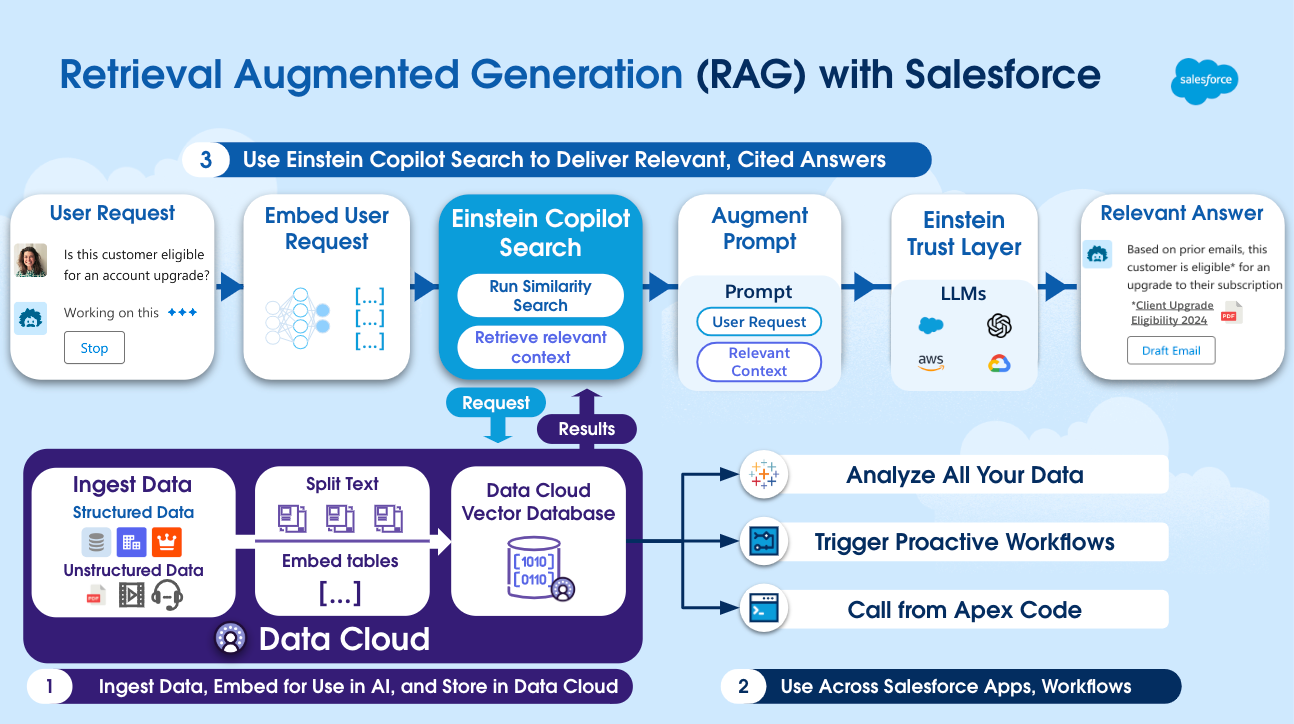
For PMs to take advantage, first curate your most relevant digital documents. It can be meeting transcripts, customer interviews, slack support channels, etc. Next, generate the embeddings:
Chroma
Chroma is a local vector database for building AI applications with embeddings.
LangChain also provides helpful python wrappers for managing embeddings and loading of documents into Chroma. Example Python code to load a local ChromaDB with documents and query.
Draft Everything
Everything comes together through Retrieval Augmented Generation (RAG) where the most relevant documents and context from the vector store are combined with an LLM prompt to generate meaningful product deliverables.
Here prompt templates are most helpful. PM templates could include:
- Drafting a PRD
- Generating a JIRA ticket or Linear issue
- Composing a product announcement press release
- Summarizing team wins for the week
- Summarizing the latest sprint demos
- And more…
This also suggests the biggest opportunity for UX innovation. Product teams with LLMs are exposing the edges of the PM stack that established vendors and new entrants will rush to fill.
What about ChatGPT Enterprise or GPTs?
Many companies are customers of OpenAI’s ChatGPT Enterprise product which offers an encrypted playground for employees to access GPT4 with company data. Also, OpenAI recently introduced GPTs to facilitate simple prompt template creation with a low code editor.
If you have access through your company, absolutely take advantage.
And as open-weight LLMs continue to accelerate, augmented by key business data via embeddings, I expect more of the value-added productivity innovation to happen inside the enterprise vs. GPT-wrappers.
To be continued…
In 2024, the best product teams and best PMs will be picking off core use cases like the ones above and automating key workflows with LLMs. Some have already started.
Stay tuned for my journey here. Please star this repository if you are interested in following along.
In the meantime, there is no better time to level-up your PM skills and productivity.
Be a LLM PM.